How Linux Became a Platform for Gaming and Digital Entertainment
Ask an old Debian user about gaming in 1999 and you might get a long sigh. Back then, playing anything more demanding than a terminal game meant hunting down a driver, recompiling a kernel module and hoping the sound card agreed to cooperate. There were bright spots. id Software shipped a native Linux version of Quake III Arena that year, and a small company called Loki Software spent a few brave years porting commercial titles to Linux before it ran out of money in 2002. But for most people, Linux was where you ran your mail server. Games lived on the other partition.
That picture has changed a great deal. Today a Debian desktop can run a huge library of open-source games straight from the repositories, thousands of native commercial titles and a large share of Windows releases through compatibility tools. The route from there to here wasn’t a neat line of progress, though. It was a messy, interesting story about packaging, drivers, licences and a few big decisions from outside the free software world.
The repositories got there first
Long before Steam arrived, Debian already had games. Plenty of them. Battle for Wesnoth, the turn-based fantasy strategy game, is free software and has been packaged for years. SuperTuxKart offers cheerful kart racing. Frozen Bubble has stolen more lunch breaks than anyone will admit. The real-time strategy game 0 A.D. has grown into something genuinely impressive. All of them install with a single apt command and update along with the rest of the system.
That model has real strengths. Packages are built, signed and checked by Debian maintainers. Updates arrive through the same channel as security fixes. And when an upstream developer loses interest, the code can live on, because a free licence lets other contributors pick it up. The Debian wiki keeps information about games in the archive, and the Debian games package index lists what’s available in the current stable release.
There’s one subtlety worth knowing. A game’s code may be free while its art, music or level data comes under a different licence. That’s why some games sit in Debian’s main archive while others, or parts of them, end up in contrib or non-free.
Why native builds still matter
A native Linux build doesn’t need a Windows compatibility layer in between. That usually means fewer surprises. It doesn’t mean the developer’s job is easy. They still have to deal with graphics, audio, input devices and the wide variety of libraries found across distributions.
SDL, the Simple DirectMedia Layer, has quietly done a lot of heavy lifting here. It gives developers one interface for windows, input and sound across Linux, Windows and macOS, and countless games depend on it. Valve’s own Linux development documentation explains how its runtime gives games a consistent set of shared libraries to rely on, regardless of what the host system looks like.
Anyone who has shipped software knows the gap between “it works on my machine” and “it works on everyone’s machine.” A game that runs fine on one developer’s laptop can break on a different graphics card, an older kernel or a distribution with a newer version of a key library. Reliable distribution to thousands of different setups is a different problem from getting one build to start.
Steam changes the game
The turning point for commercial games came in February 2013, when Valve officially launched Steam for Linux after a public beta the previous winter. Suddenly a big, mainstream store was selling games on Linux and encouraging studios to make native builds. Not every studio did, but many tried.
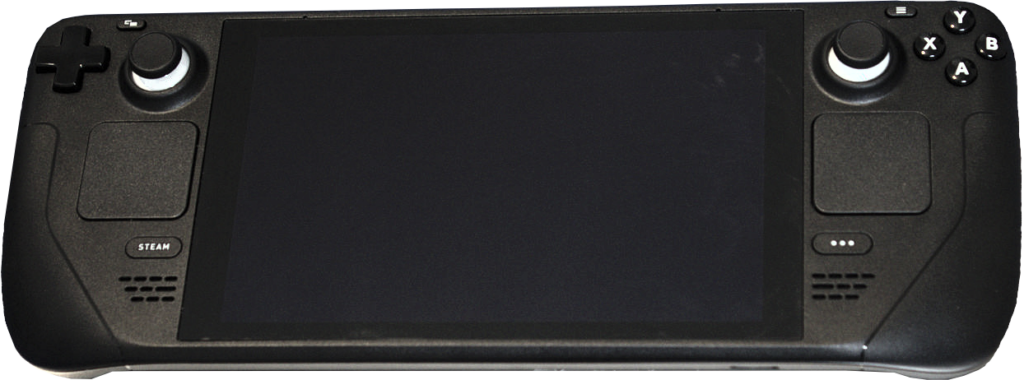
Then, in 2018, Valve introduced Proton. Built on Wine and a set of other open-source projects, Proton lets many Windows games run on Linux without a native port. It was a pragmatic move. Instead of waiting for every studio to support Linux, it brought the games to Linux anyway. The Steam Deck, launched in 2022 and running a Linux-based SteamOS, turned that pragmatism into a handheld millions of people now use without knowing or caring what operating system is underneath.
Compatibility still varies, and it’s worth being realistic about it. A game that runs perfectly today can break after an update. Drivers matter. Hardware matters. Anti-cheat systems were a major barrier for years, and although some anti-cheat vendors added Proton support in 2021, publishers still have to switch it on. The Debian wiki’s Steam documentation covers the practical side, including enabling the i386 architecture that Steam still needs.
Games can also reach a Debian machine through very different routes. There are distribution packages, vendor stores and standalone installers downloaded from a developer’s website. Each route has its own update model and its own level of trust. Knowing which one a game came from tells you who’s responsible when something goes wrong.
Three players, three setups
Picture three people on Debian. The first plays Battle for Wesnoth, installed from the archive. Updates come with the rest of the system, and if a bug appears, Debian’s tracker is the place to report it. The second plays a commercial game with a native Linux build through Steam. When that breaks, it’s usually a question for the developer or for Valve. The third plays a Windows game through Proton. When that breaks, the answer could lie with the game, with Proton, with the graphics driver or with all three.
The lesson is simple. One game working on your system doesn’t prove another will. Every game, version, machine and distribution combination is its own test case. Forum posts saying “works perfectly” are useful clues, not guarantees.
The graphics stack, layer by layer
When a game misbehaves, it helps to think in layers. At the top is the graphics API the game uses. Older titles often rely on OpenGL. Newer ones increasingly use Vulkan, released in 2016, which Proton also leans on heavily to translate Windows graphics calls. Below that sits the driver. Below that is the windowing environment, whether that’s X11 or Wayland.
A few diagnostic questions save a lot of time. Is the graphics card recognised by the system at all? Is the right driver loaded, whether that’s the open-source Mesa stack or a proprietary one? Does the hardware actually support the API the game needs? And is the problem limited to one title, or does every game stutter?
Graphics aren’t the whole story, either. CPU, memory, storage speed and in-game settings all affect performance. A single benchmark score tells you very little about how a particular game will feel on your particular machine.
Games in a browser tab
Not every game needs installing. A lot of casual play now happens in a browser, using web technologies for graphics, input and sound. On a Debian desktop with Firefox or Chromium, browser-based entertainment can be the simplest option of all, with no packages, no drivers to wrestle and no compatibility layer.
That convenience has trade-offs. Performance depends on the browser, the network, whether hardware acceleration is switched on and how much data the site stores locally. And because a browser game lives on someone else’s server, the operator can change it, remove features or shut it down at any time. You don’t control the version, and you may not be able to play offline.
Multimedia on Linux has its own history of trade-offs. Our article on the debate surrounding audio codecs in the early 2000s looks back at how patent licensing shaped what free software distributions could ship.
A sensible way to set up a gaming machine
If you’re putting together a Debian system for games, start with a list. Which games do you actually want to play? Do they have native Linux builds? Does the publisher officially support Linux, or only Windows? Do any of them need online multiplayer with anti-cheat?
Then write down your setup. Note the Debian release, the graphics hardware and the driver in use. Be careful with instructions written for other distributions or older Debian releases. A command that worked on Ubuntu three years ago may cause trouble on Debian stable today.
Prefer sources that can be updated cleanly, and know which packages Debian manages and which ones you added yourself. Back up save files and configuration before major upgrades. Test risky changes somewhere recoverable, like a separate user account or a spare partition. And be wary of any installer that promises a dramatic performance boost from an unknown source. Valve’s Linux platform guidance is a good reference for what officially supported games expect from the system.
Where things stand
Linux gaming no longer feels like a hobby within a hobby. Between Debian’s own archive, native commercial builds, Proton and the browser, there are more ways to play on a free operating system than ever before. Each route has its own strengths and its own maintenance questions. Understanding which one you’re using is most of the battle, and the rest is usually a driver.